Programming With Data
Loading NOAA weather observations into SQLite with Python, then querying and charting them.
Load the data
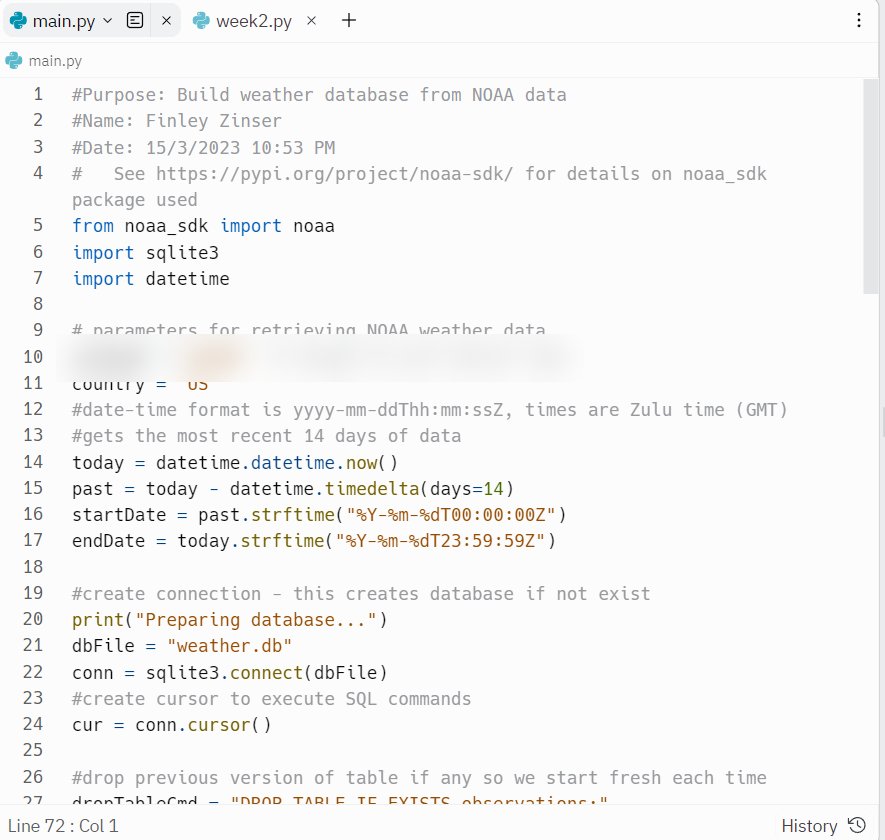
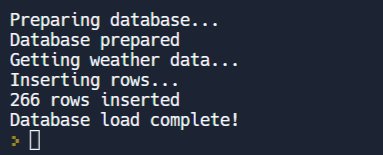
BuildWeatherDb.py asks the NOAA SDK for the last 14 days of observations and stores them in weather.db.
#gets the most recent 14 days of data
today = datetime.datetime.now()
past = today - datetime.timedelta(days=14)
startDate = past.strftime("%Y-%m-%dT00:00:00Z")
endDate = today.strftime("%Y-%m-%dT23:59:59Z")Preparing database...
Database prepared
Getting weather data...
Inserting rows...
266 rows inserted
Database load complete!Screenshot of the real run
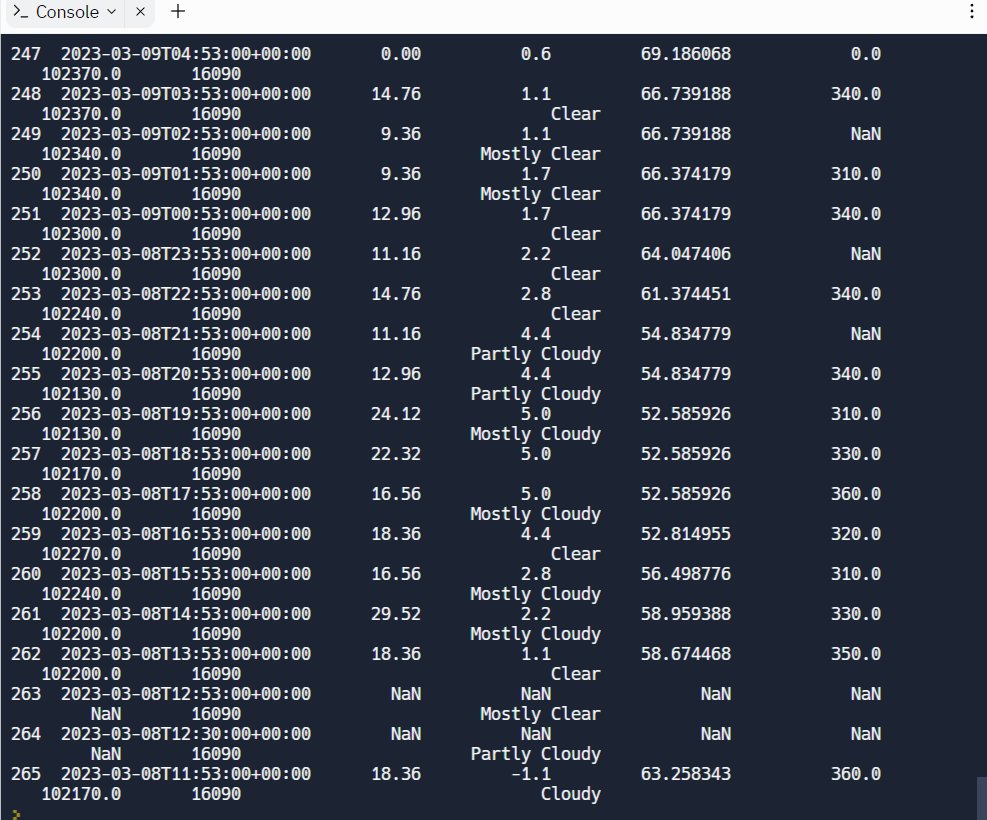
Every observation
The end of the result as it appears in my screenshot: the last rows of the table, wrapped by the console.
SELECT * FROM observations;255 2023-03-08T20:53:00+00:00 12.96 4.4 54.834779 340.0
102130.0 16090 Partly Cloudy
256 2023-03-08T19:53:00+00:00 24.12 5.0 52.585926 310.0
102130.0 16090 Mostly Cloudy
257 2023-03-08T18:53:00+00:00 22.32 5.0 52.585926 330.0
102170.0 16090
258 2023-03-08T17:53:00+00:00 16.56 5.0 52.585926 360.0
102200.0 16090 Mostly Cloudy
259 2023-03-08T16:53:00+00:00 18.36 4.4 52.814955 320.0
102270.0 16090 Clear
260 2023-03-08T15:53:00+00:00 16.56 2.8 56.498776 310.0
102240.0 16090 Mostly Cloudy
261 2023-03-08T14:53:00+00:00 29.52 2.2 58.959388 330.0
102200.0 16090 Mostly Cloudy
262 2023-03-08T13:53:00+00:00 18.36 1.1 58.674468 350.0
102200.0 16090 Clear
263 2023-03-08T12:53:00+00:00 NaN NaN NaN NaN
NaN 16090 Mostly Clear
264 2023-03-08T12:30:00+00:00 NaN NaN NaN NaN
NaN 16090 Partly Cloudy
265 2023-03-08T11:53:00+00:00 18.36 -1.1 63.258343 360.0
102170.0 16090 CloudyScreenshot of the real run
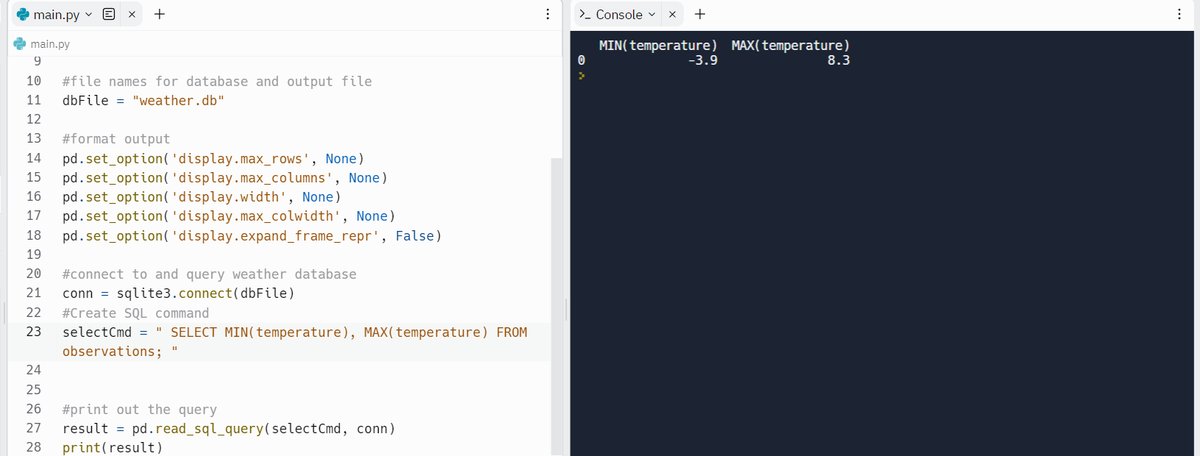
Lowest and highest
The lowest and highest temperatures in the data set, in degrees Celsius.
SELECT MIN(temperature), MAX(temperature) FROM observations; MIN(temperature) MAX(temperature)
0 -3.9 8.3Screenshot of the real run
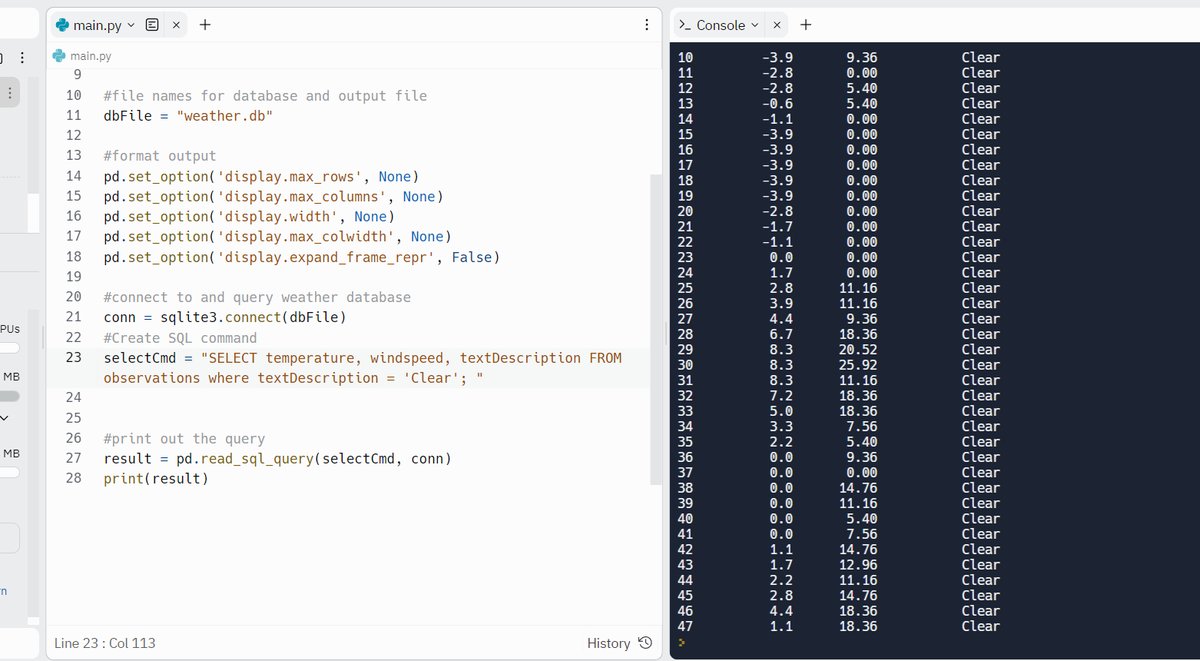
Clear observations
Temperature, wind speed and conditions for every clear observation. My screenshot shows rows 10 to 47; the first rows had scrolled out of view.
SELECT temperature, windspeed, textDescription
FROM observations
WHERE textDescription = 'Clear';10 -3.9 9.36 Clear
11 -2.8 0.00 Clear
12 -2.8 5.40 Clear
13 -0.6 5.40 Clear
14 -1.1 0.00 Clear
15 -3.9 0.00 Clear
16 -3.9 0.00 Clear
17 -3.9 0.00 Clear
18 -3.9 0.00 Clear
19 -3.9 0.00 Clear
20 -2.8 0.00 Clear
21 -1.7 0.00 Clear
22 -1.1 0.00 Clear
23 0.0 0.00 Clear
24 1.7 0.00 Clear
25 2.8 11.16 Clear
26 3.9 11.16 Clear
27 4.4 9.36 Clear
28 6.7 18.36 Clear
29 8.3 20.52 Clear
30 8.3 25.92 Clear
31 8.3 11.16 Clear
32 7.2 18.36 Clear
33 5.0 18.36 Clear
34 3.3 7.56 Clear
35 2.2 5.40 Clear
36 0.0 9.36 Clear
37 0.0 0.00 Clear
38 0.0 14.76 Clear
39 0.0 11.16 Clear
40 0.0 5.40 Clear
41 0.0 7.56 Clear
42 1.1 14.76 Clear
43 1.7 12.96 Clear
44 2.2 11.16 Clear
45 2.8 14.76 Clear
46 4.4 18.36 Clear
47 1.1 18.36 ClearScreenshot of the real run
- Course
- CEIS110, DeVry University
- Tools
- Python (noaa_sdk, sqlite3, pandas, matplotlib), SQL, Excel, VS Code, Replit
- Timeframe
- Mar – Apr 2023
Overview
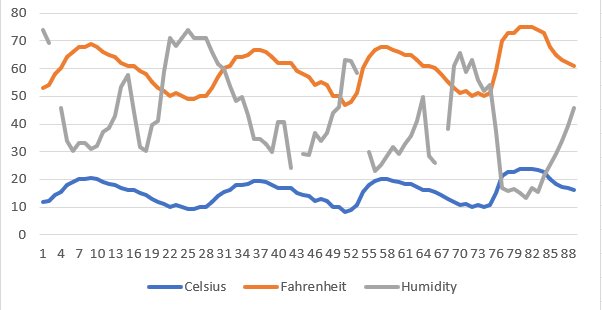
I built a small data pipeline in Python. One script downloaded two weeks of weather observations from NOAA into a SQLite database. I queried the data with SQL, exported temperature and humidity to a CSV file with a Celsius-to-Fahrenheit conversion, and charted the results in Excel and matplotlib to see how the two weeks compared.
How I built it
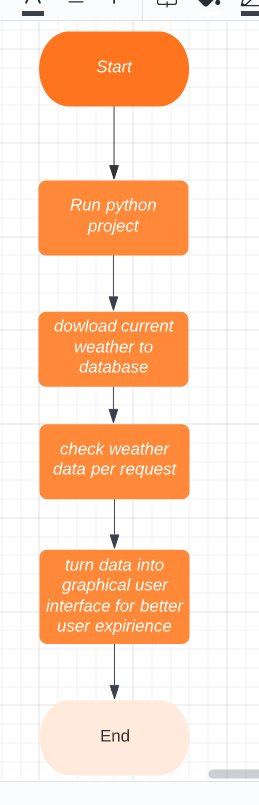
Planned the pipeline.
I drew a flowchart of the steps: run the program, download the weather data to a database, query it, and turn it into charts.
Photos (1)
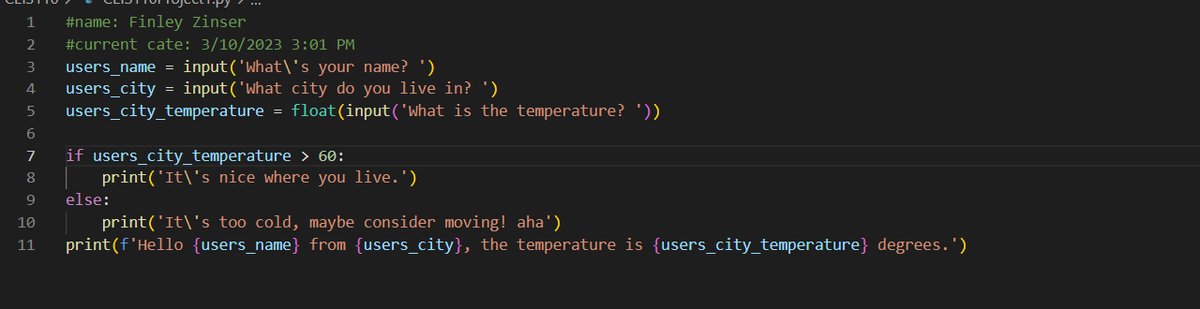
Warmed up with a simple program.
A short Python script asks for the temperature where you are and replies based on your answer.
Photos (1)
Downloaded the data.
BuildWeatherDb.pyuses the NOAA SDK to fetch the last 14 days of observations and store them inweather.dbwith sqlite3. The run inserted 266 rows.Photos (2)
Queried it with SQL.
I pulled every row, found the lowest and highest temperatures (−3.9 °C and 8.3 °C), and listed the temperature, wind speed and conditions for every clear observation.
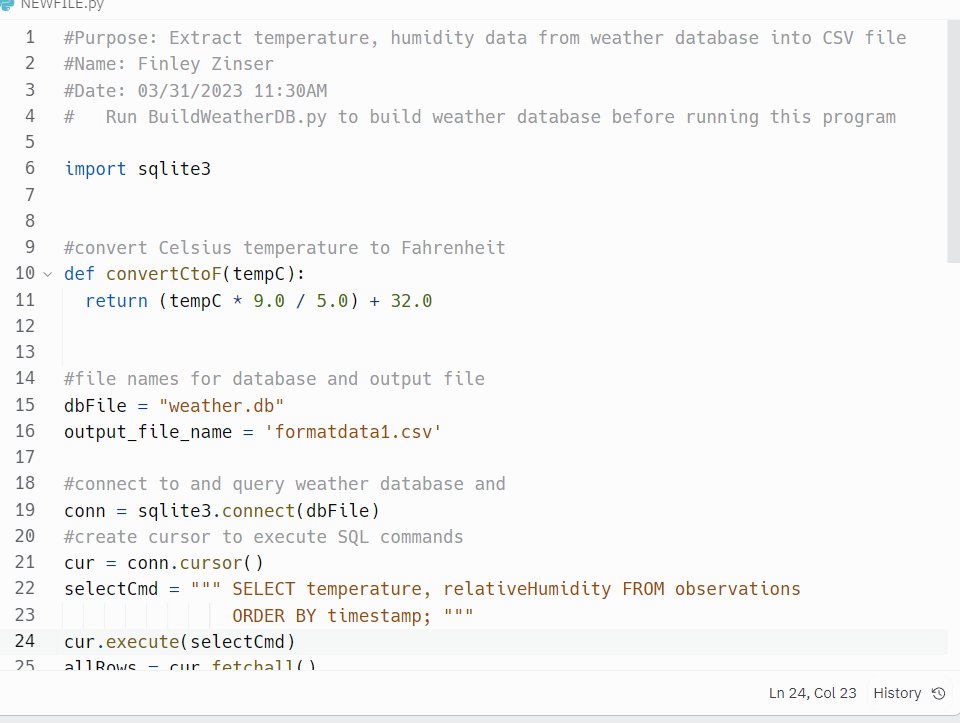
Exported it with Python.
ExtractTempHumidity.pyreads temperature and humidity in time order, converts Celsius to Fahrenheit, and writes the result to a CSV file. I opened the file in Excel and charted temperature and humidity.Photos (2)
Charted it with pandas and matplotlib.
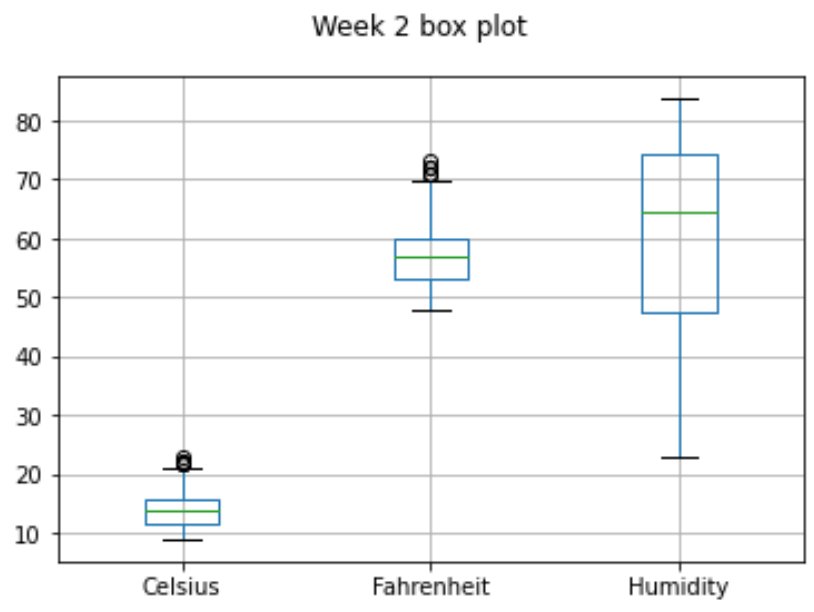
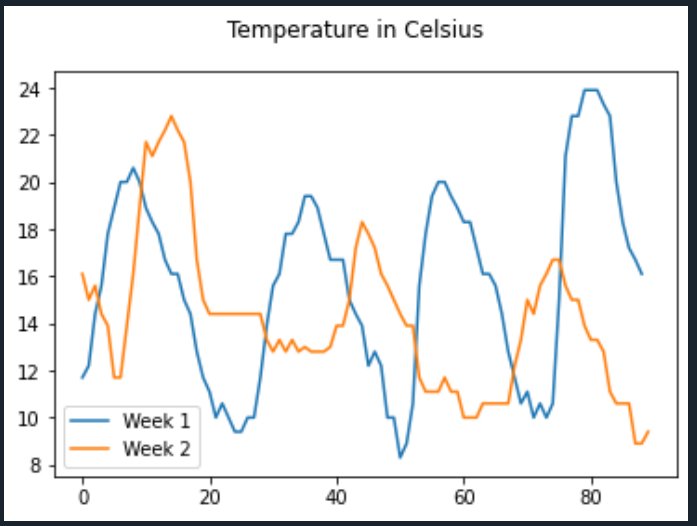
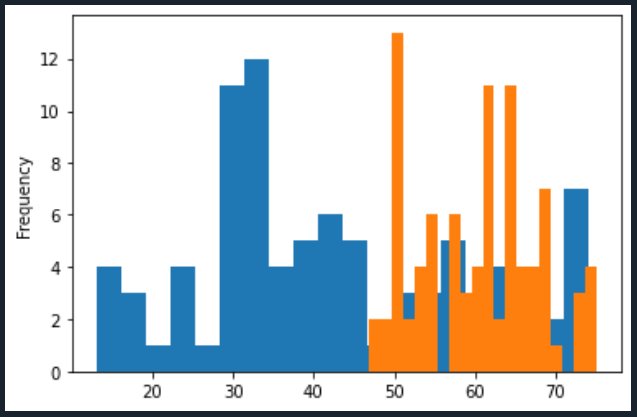
I made a box plot of the second week, a line plot comparing week 1 and week 2 temperatures, and a histogram comparing humidity and heat.
Read the results.
I asked whether hotter readings go with higher humidity. In this data, temperature spikes lined up with humidity spikes, though how humid weather feels varies from region to region. Across the two weeks, the temperature was slowly rising.
Code: the export query
The export query from ExtractTempHumidity.py:
SELECT temperature, relativeHumidity FROM observations ORDER BY timestamp;BuildWeatherDb.py and the convertCtoF function appear only in screenshots.
Three plots

Box plot
# Purpose: create a box plot for week 2 data
import pandas as pd
import matplotlib.pyplot as plt

df2 = pd.read_csv("formatdata2.csv")
df2.boxplot()
plt.suptitle("Week 2 box plot")
plt.show()
Week 1 vs week 2
# Purpose: compare Celsius readings for week 1 and week 2
import pandas as pd
import matplotlib.pyplot as plt

df1 = pd.read_csv("formatdata1.csv")  # week 1 (older)
df2 = pd.read_csv("formatdata2.csv")  # week 2 (more recent)

plt.figure()
df1.Celsius.plot(label="Week 1")
df2.Celsius.plot(label="Week 2")
plt.legend(loc="best")
plt.suptitle("Temperature in Celsius")
plt.show()
Humidity and heat
Blue is temperature and orange is humidity.
Challenges and what I learned
Challenges
- Getting
weather.dbto download took a long time,because the IDE I was using didn't have everything installed correctly. - The graphs were harder than I expected.They didn't show up the way I thought they would, and sometimes they didn't show up at all.
- One of my files corrupted right before I submitted it,and I had to redo it.
What I learned
I learned Python's basic syntax and data types, how to write functions and use modules, and how to handle exceptions and catch errors. I also learned how to analyze data and graph it with Python. Building a weather database and turning it into charts gave me a better understanding of how data works and how it can be useful in everyday life, and a lot of practice finding and fixing errors.